Introduction
Parley offers a secure and reliable ways to communicate with your customers. This is done through many different APIs and libraries. This is a short introduction into the different options and we try to help you select which one you should use to accomplish your goals.
The landscape of the different APIs and libraries can be a bit daunting at first but for what you want to accomplish you will usually only focus on one or a specific set of them. In the diagram below you can see how each of them is connected and at which point the app/site/bot you are working on usually fits in (purple).
The Parley API and library landscape
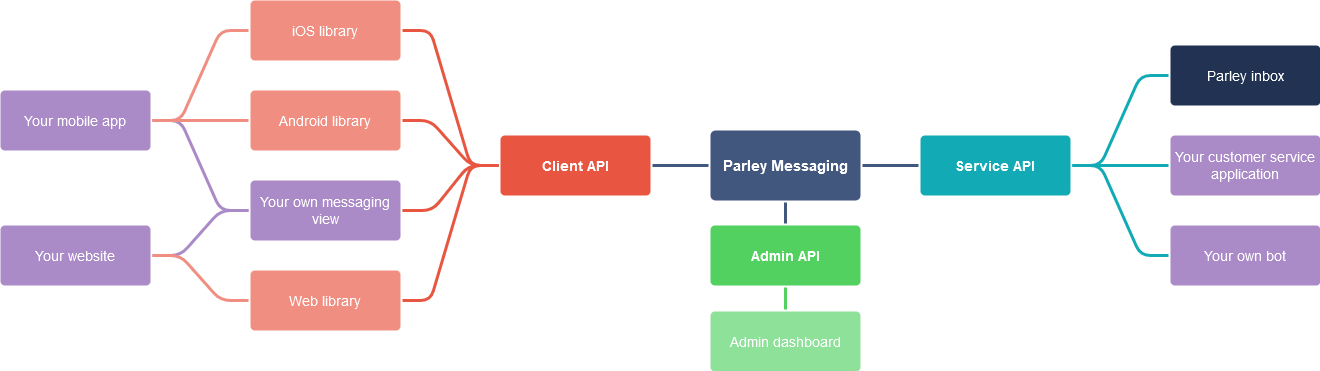
The flow within goes from the client side (red) where a customer send a message to your company. They are on your website or mobile app and use one of our libraries or your own view to show it's conversation with you. After this the message goes to the other side, the Service API (blue green), were the message is send to Parley Inbox (dark blue), your customer service application or a bot you have build. This side can then send a reply which is then pushed (through the client API) to the libraries or your own view.
If you need to change settings around how your Parley account functions you can use the Admin dashboard (green), and when you want to automate this for many accounts you can use the Admin API (green).