Handover protocol
With the Service API v2.1.0 release it is now possible to have multiple Services connected to 1
Parley account.
This means that, for example, you can have:
- a Service act as a Bot to handle all new messages
- another Service (accessed by Humans) which will handle any complex questions
Switching between these Services is done using the Handover protocol.
Api calls
We have created 3 new API calls for this protocol
PUT owner
Updates whichService will have access to send messages to this User. Multiple
Services can be connected to 1 Account, but only 1 Service can be "connected" to an
User.
GET owner
Retrieves the owner
GET services
Retrieves a list ofServices for the Account you are connecting with
Flow
Let's look at the Client -> Bot -> Agent flow as an example.
There are 2 Services connected to this Account:
- Bot Service (https://bot.service.com/callback)
- Agent Service (https://agent.service.com/callback)
First we will have to make sure the Bot Service is the "default" Service. This means that all the messages, of new clients, will be send to this Service.
If you call GET services you will retrieve a list of Services connected to this Account:
{
  "data": {
    "services": [
      {
        "identification": "as272d6g2ds766fcdfgh",
        "name": "Bot Service",
        "default": "true"
      },
      {
        "identification": "Jlk9e7cSf9g3FFsaqe39",
        "name": "Agent Service",
        "default": "false"
      }
    ]
  },
  "notifications": [],
  "status": "SUCCESS",
  "metadata": {
    "method": "get",
    "duration": 0.014
  }
}
We can see that our Bot Service is the default. If you want to change your default Service, you can
do that in your admin.parley.nu environment under the settings->Service information tab.
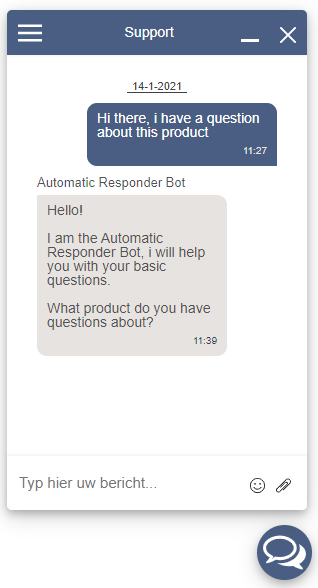
Now once we send a message (as a new client) to the Account, the Bot Service will receive this message and could reply back.
Client asks a question and gets a response from the Bot
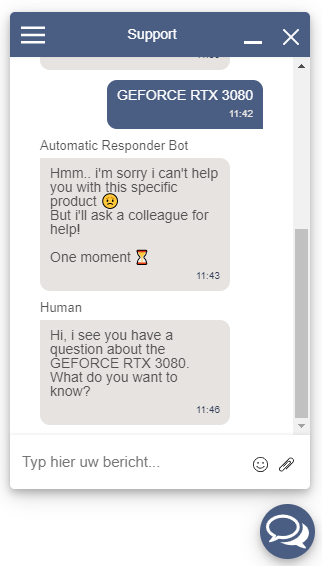
It could be that the Bot can not answer one of the questions and would like a Human to continue the conversation. This is where Handover protocol begins.
Before the Agent Service can send replies, we need to give it access to this conversation.
(due to the way Parley works, there are no "conversations" and thus we give access to the User instead)
To do that, the Bot Service should call the PUT owner
Api call.
This Api call needs some info:
userId; This is the ID of the User within Parley (the Bot Service already has this information for sending replies to this User)newOwner; This will be the identification of the Agent Service,Jlk9e7cSf9g3FFsaqe39in our example.metadata; This can be anything you like. For example you can send context to the Agent so it knows why the Bot decided to hand this over"reason": "question_too_complex"
Once the Bot Service has called this Api call, it will receive the following response:
{
  "data": {},
  "notifications": [
    {
      "type": "success",
      "message": "owner_updated_successfully"
    }
  ],
  "status": "SUCCESS",
  "metadata": {
    "values": {
      "url": "users/20/owner",
      "newOwner": "Jlk9e7cSf9g3FFsaqe39",
      "metadata": {
      	"reason": "question_too_complex"
      }
    },
    "method": "put",
    "duration": 1.731
  },
  "media": {}
}
Now the Agent Service has permission to send replies to this User.
Bot hands over conversation to Human and Human responds