Push notifications
Notifications
The end-user must allow the browser to show notifications by accepting the following browser alert (note: this may look different on other browsers):

Depending on whether the user allows or declines the permission to send them notifications we will use the push or pull method of Retrieving new messages.
Debugging this alert
It could be that the user does not get this alert, there are 2 things that could cause this:
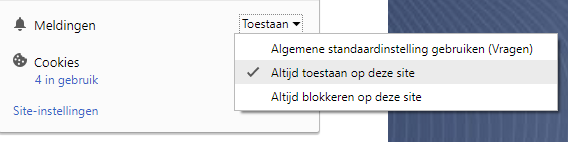
- The browser always allows notifications on this site
- The browser always blocks notifications on this site
Here is an example (note: this may look different on other browsers) on how to change the behaviour described above:

The browser that is used needs to support web notifications
Can I Use notifications? Data on support for the notifications feature across the major browsers from caniuse.com.
Service workers
The browser needs to be able to work with “service workers” (in short: browser background processes). These enable the chat to show notifications even when the tab, where the chat has been started, is closed. The browser itself must be open to receive these notifications. If the browser is closed and opened later on, the user will receive a notification of messages that has been sent during the time when the browser was closed.
The implementation of this service worker is defined in the firebase-messaging-sw.js file. This file is optional, meaning that if you don't have this file the chat will recognize that it is missing and will not make use of service workers.
Here is a short list of which browsers support Service workers:
Can I Use serviceworkers? Data on support for the serviceworkers feature across the major browsers from caniuse.com.
Because older versions of Edge does not yet support ServiceWorkers, we are using a fallback system that allows Edge to show notifications for each new message. Because Edge does not use the ServiceWorker, the notifications will not appear when the browser tab has been closed. Only when the browser tab is not in focus. (added in version 1.0.10)