Settings
The web library has a lot of settings for you to tweak the appearance and behavior of Parley on your website. We provided a basic example during installation, this page describes all the different options available to you.
Settings with the “lock” icon (:fa-lock:) should not be changed.
The “name” column shows the variable name in JavaScript.
The “default value” column shows the variable’s default value when not changed.
The “description” column shows a small explanation of the setting.
The “version” column shows in which version the setting was introduced.
General
Used as window.parleySettings.name
| Name | Default value | Description | Version |
|---|---|---|---|
| apiDomain | "https://api.parley.nu" | Location of the API that is used for handling messages. | 1.0.1 |
| apiVersion | "v1.3" | The version of the Client API which is used to communicate with. | 1.2.22 |
| roomNumber | "0W4qcE5aXoKq9OzvHxj2" | The accountId which the customer will connect to send its messages. We will create one for you if you do not have one yet. | 1.0.1 |
| userId | DEPRECATED use authHeader instead | 1.0.1 | |
| authHeader | This is used to authenticate the customer to the API so it can make calls as an “registered” user. How to generate the authorization header | 1.0.1 | |
| weekdays | Settings with the “lock,\ on (:fa-lock:) should n,\ e changed. The **“name,\ column shows the variable ,\ in JavaScript. The “,\ ult value” column sho,\ he variable’ | Used to calculate when to show the offlineNotification or hide the chat. Depends on what you used in interface.hideChatAfterBusinessHours Added in version 1.2.20\ Abillity to use timestamps for setting business hours for specific dates, format;\ [openingTimeUnix, closingTimeUnix] Added in version 1.2.21\ Ability to define a period as being "open" or "closed" specifically.\ Format; ["weekday", start, end, openOrClosed], where openOrClosed is a boolean true = open (default) and false = closed. This also works for the timestamp format. | 1.0.1 |
| Interface | object | Described in own table | |
| runOptions | object | Described in own table | |
| fcmConfig | object | Described in own table | |
| events | object | Described in own table | 1.2.10 |
| htaccessString | Used for the Authorization header of one of our HEAD calls. When that file is behind a .htaccess it needs the username/password to create the Authorization header to access that file.\ Format: “username:password” | 1.0.1 | |
| xIrisIdentification | You can override the x-iris-identification header by using this setting. This is the second part of the header: [accountId]:[uniqueAppDeviceId] | 1.0.1 | |
| userAdditionalInformation | object | This object is send every time the device is registered (upon starting a new chat or by manually registering the device registerNewDevice()). It can contain anything you want as long as the connected Service can interpreter it. | 1.2.10 |
| storagePrefix | "parleychat_" | The prefix used in the Key field for each localStorage item. | 1.2.11 |
Interface
Used as window.parleySettings.interface.name
| Name | Default value | Description | Version |
|---|---|---|---|
| feedback :fa-lock: | false | DEPRECATED\ When true it loads the feedback plugin. Once the customer clicks on the close button (“X”) the feedback view will popup.\ \ You will need to set hideCloseBtn to true if you want to use this. | 1.0.1 |
| hideChatAfterBusinessHours | false | When true it hides the chat button outside of bussiness hours.\ \ When false it wil show an offline notification with the text specified in offlineNotification | 1.0.1 |
| closeAlert | false | (Removed in version 1.1.1, it will always trigger when hideCloseBtn is set to false)\ \ (Re-Added in version 1.2.0, it will only show the alert when the closeButton is clicked, and this setting is set to 'true')\ \ When true it shows a message if the user wants to clear its cookies with yes/no buttons\ After yes is clicked, it will clear the cookies and minimize the parleychat messenger.\ After no is clicked, it will just minimize the messenger.\ \ example | 1.0.1 |
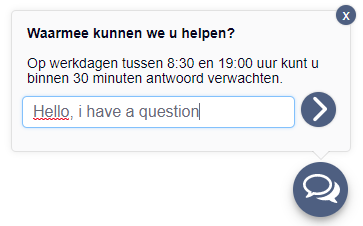
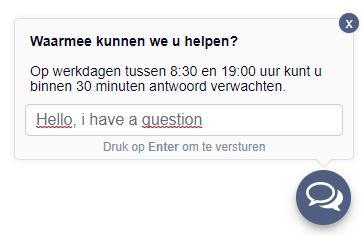
| inviteNotificationSendButton | false | Shows the send button instead of the ‘enter to send’ in the invite notification. (this behaviour is already default when viewing the chat on a mobile device)\ \ example In v1.2.18 this also controls the visibility of the send button in the conversation screen, because there was no separate setting for this | 1.0.1 |
| hideInputAfterBusinessHours | false | When true, it will hide the input field in the Offline Notification window when you are outside of the defined Business Hours (see setting: weekdays) Also: When you have started a chat inside business hours and you reload the chat outside business hours, you will get the Offline Notification instead of the Chat window. | 1.4.2 |
Examples
inviteNotificationSendButton
Set to true
Set to false
RunOptions
Used as window.parleySettings.runOptions.name
| Name | Default value | Description | Version |
|---|---|---|---|
| country | browser’s language | Defines which runOptions.interfaceTexts settings the chat should use.\ \ There are 2 languages * Dutch: “nl” * English: “en” | 1.0.1 |
| hideNewMessageInNotification :fa-lock: | true | 1.0.1 | |
| hideCloseBtn | true | Hides the “X” button from the chat.\ \ The close button behaves exactly the same as the minimize button.\ \ example | 1.0.1 |
| hideInviteNotification | false | Hides the notification that asks the customer if they have a question before the chat is opened. | 1.0.1 |
| inviteNotificationInterval | 10 | The time in seconds before the Invite Notification can be shown. The notification won’t be shown automatically, but you can trigger it by using showInviteNotification(). | 1.0.1 |
| interfaceTexts | object | Described in own table. | 1.0.1 |
| icon | "" | Used for the icon shown on the chat button. (path/to/the/icon.file)\ \ example | 1.0.1 |
| allowFileUpload | true | Tells the chat to show/hide the button to upload a file.\ \ example | 1.0.1 |
| allowEmoji | true | Tells the chat to show/hide the button to send an emoji.\ \ example | 1.0.1 |
| sensitiveDataAttributes | [] | Adds the provided strings as attributes to elements which could contain personal information.\ \ Could be used for example with Hotjar to make screenshots and hide personal information. | 1.1.1 |
| sensitiveDataClasses | [] | Adds the provided strings as classes to elements which could contain personal information.\ \ Could be used for example with Hotjar to make screenshots and hide personal information. | 1.1.1 |
| infoUrl | "" | Url of the page that will open when a user clicks on the info option in the chat menu (this option is only visible if a value is set). | 1.1.1 |
| hidePoweredByParley | false | When enabled, it hides the “powered by parley” bit from the options menu. | 1.2.0 |
| downloadFileName | "parley_conversation" | The name of the file that will be downloaded when a user clicks on the “download” button in the options menu. | 1.2.0 |
| showAgentName | true | Enabling this will show the name of the agent above the message it has send. | 1.2.10 |
| parentNode | document.body | The DOM Node in which the HTML will be rendered. | 1.2.16 |
| isTypingEnabled | true | Disabling this will stop the weblibrary from sending "typing" events to Parley. | v1.2.23 |
| chatOpenedEnabled | true | Disabling this will stop the weblibrary from sending the "chatOpened" event to Parley. | v1.3.0 |
Examples
hideCloseBtn
Set to true

Set to false

icon
default icon

value set to 'https://d2uvvge0uswb28.cloudfront.net/static/dist/v0/img/svg/icon-play.svg'

allowFileUpload
Set to false

Set to true

allowEmoji
Set to false

Set to true

InterfaceTexts
Used as window.parleySettings.runOptions.interfaceTexts.name
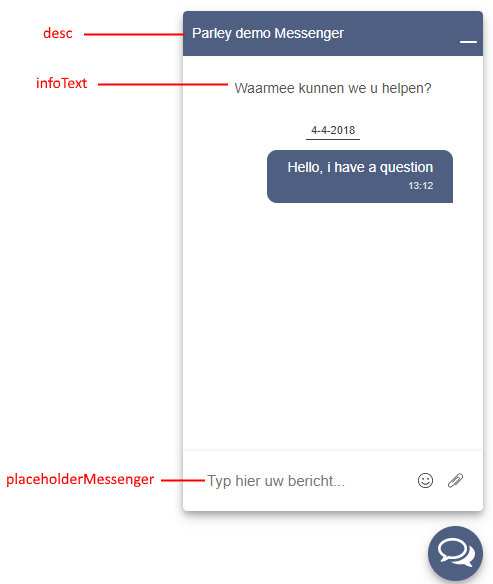
There are 2 interfaceTexts definitions, one for english and one for dutch. The one that is used is defined by the runOptions.country value. This will only list the default values for the English language. See: text overview for visual example
| Name | Default value | Description | Version |
|---|---|---|---|
| icon | "" | The url of the icon used in the notifications for Edge. | 1.0.1 |
| desc | “Default Chat - EN” | The title of the chat and also the title of the notifications for Edge. | 1.0.1 |
| infoText | "How can we help you?" | Text shown in the chat when the chat is first started. (empty) | 1.0.1 |
| offlineText | "This chat is offline..." | Deprecated removed in version 1.1.1\ \ The text that is shown in the chat when there is no active connection with the API or something went wrong while connecting. | 1.0.1 |
| feedbackComposerTitle :fa-lock: | "You can use your assessment to explain?" | Used for the feedback view. | 1.0.1 |
| feedbackTitle :fa-lock: | "What did you think of our service? Fill out an assessment in the following a number of stars to give." | Used for the feedback view. | 1.0.1 |
| comments :fa-lock: | "Type here your comments..." | Used for the feedback view. | 1.0.1 |
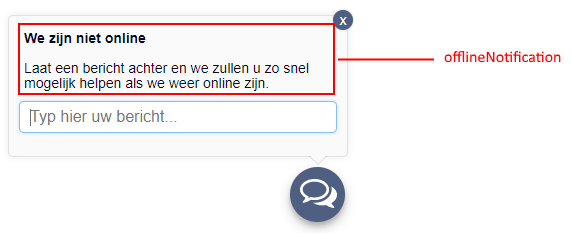
| offlineNotification | "We are not onlinePlease leave a message and we will respond to you as soon as possible" | Shown in chat when chatting after business hours. | 1.0.1 |
| placeholderMessenger | "Type here your message..." | Text shown in the chat’s textarea. | 1.0.1 |
| emojiCategory | Settings with the “lock” icon (:fa-lock:) should not be changed | The names of the different emoji categories. | 1.0.1 |
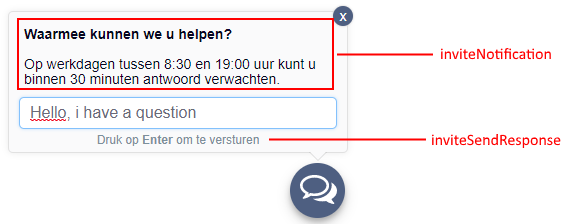
| inviteNotification | "How may we help you?On weekdays between 8:30 and 19:00 hours, within 30 minutes you expect a response." | The text shown in the Invite Notification. | 1.0.1 |
| inviteSendResponse | "Push Enter to send" | This text is shown when the customer has typed in some text in the Invite Notifcation’s textbox. | 1.0.1 |
| buttonLabel | "How can we help you?" | This text is shown on the button that opens the chat. | 1.0.1 |
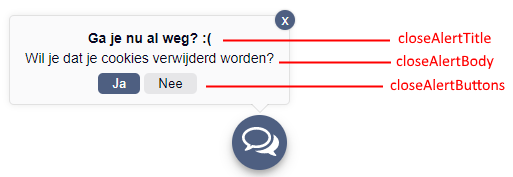
| closeAlertTitle | "Leaving already? :(" | This text is shown as the title on the closeAlert. | 1.0.1 |
| closeAlertBody | "Do you want to clear your cookies?" | This text is shown as the title on the closeAlert. | 1.0.1 |
| closeAlertButtons | Settings with | This is the text for the left and right button on the closeAlert. | 1.0.1 |
| optionsDownloadText | "Download conversation" | This text is shown for the download option of the chat menu | 1.1.1 |
| optionsInfoText | "About this app" | This text is shown for the info option of the chat menu (see infoUrl) | 1.1.1 |
| messageSendFailed | "Something went wrong while sending your message, try again later" | This text is shown when a message fails to send to the Parley API. | 1.2.10 |
| imageFormatIncorrect | "This file is not an image" | This text is shown when the user tries to upload a file which is not of type image/jpeg\ image/png\ image/gif | 1.2.10 |
| imageTooBig | "This image exceeds the max size of 10mb" | This text is shown when the user tries to upload an image which exceeds the 10mb limit. | 1.2.10 |
| serviceUnreachableNotification | "The service is unreachable at the moment, please try again later." | This text is shown when the API is not reachable by the web library. (Triggered by a HTTP_STATUS 502,503,504 or if the request is blocked by the browser) | 1.2.10 |
| serviceUnreachableNotificationAlert | "The service is unreachable at the moment, please try again later." | This text is shown in a seperate window when the API is not reachable by the web library. This one differs from serviceUnreachableNotification, because that one is only shown when the user is inside the chat (conversation) window. This one is shown everywhere else. | 1.2.10 |
| agentTypingText | "is typing ..." | This text is shown when the Agent starts typing. The text is always prefixed with the agent's name and a space resulting in "Bob is typing ...". | 1.7.2 |
Examples
Open messenger
Invite
offlineNotification
closeAlert
options menu

FCM config
Used as window.parleySettings.fcmConfig.name
Before changing any of the settings with * behind their name, please
read FCM (Firebase Cloud Messaging). If you decide to use your own FCM project for
push notifications, you also need to give us access to that project.
| Name | Default value | Description | Version |
|---|---|---|---|
| apiKey * | "AIzaSyAlkM_fm46Z6gK-YggfThYCEapaM5euFXo" | FCM’s API key. | 1.0.1 |
| authDomain * | "irischat-push.firebaseapp.com" | Url of the firebase project. | 1.0.1 |
| databaseURL * | "https://irischat-push.firebaseio.com" | Url of the firebase project’s database. | 1.0.1 |
| projectId * | "irischat-push" | Firebase project ID. | 1.0.1 |
| storageBucket * | "irischat-push.appspot.com" | Url of the firebase project’s storage | 1.0.1 |
| messagingSenderId * | "183169717483" | Sender ID | 1.0.1 |
| serviceWorkerLocation | “./firebase-messaging-sw.js” | Location (starting from where the current page .html is located) of the service worker script used to handle Push messages.\ \ You cannot host this file on a different domain than where the chat is loaded. (see why) | 1.0.1 |
| enabled | true | Choose whether or not to initialize FCM (push notifications).\ Values can be ‘true’ or ‘false’. | 1.0.1 |
| scope | null | The scope in which the serviceWorker is allowed to interact with the pages. When null it disables the whole scoping feature and allows you to load your serviceworker script from anywhere on the domain, this is the normal behavior for versions before 1.2.11. See: https://developer.mozilla.org/en-US/docs/Web/API/ServiceWorkerContainer/register -> Parameters -> Options for more information. | 1.2.11 |
| scopeBlacklist | [] | This is a list of absolute url's which should be ignored by the service worker. | 1.2.12 |
| notificationLink | location.href | This is the link to which the browser will navigate if you click on the push notification while your original tab/window (in which you started your chat) is closed. The value will only be used once, when the chat is initially started (when the FCM service worker is created). After that any change to this value will be ignored. If this setting is not working for you, it could be there is another url configured for your account in our Database, please let us know at support@parley.nu so we can clear that configured url for you. | 1.2.17 |
Events
This feature is still experimental
Used as window.parleySettings.events.name
In the events object you can override custom callbacks for events that we trigger.
Example: When the client's authorizationHeader expires (the API will return an error), we call
window.parleySettings.events.onAuthorizationExpired() so that the developer can create a new authorizationHeader in
this callback.
The developer can override the callback by simply overriding the value of the event's name.
window.parleySettings.events.onAuthorizationExpired = function(){ ... }
| Name | Default value | Description | Parameters | Version |
|---|---|---|---|---|
| onAuthorizationExpired | undefined | Called when the API returns an error that the authorizationHeader is expired. | none | 1.2.10 |
| addEmoji | undefined | Called when you click on an emoji in the emoji-picker. | (eventName, emojiValue) | 1.2.12 |
| clearConversation | undefined | Called by the deleteAllFromStorage event, to clear all messages from the DOM en Memory. | (eventName) | 1.2.12 |
| deleteAllFromStorage | undefined | Called by the global.parleySettings.deleteAllDataFromStorage() function. | (eventName) | 1.2.12 |
| destroyApplication | undefined | Called by the global.parleySettings.destroyParleyMessenger() function. | (eventName) | 1.2.12 |
| displayPluginContainer | undefined | Called when the "invite notification", "offline notification" or "api unreachable notification" is shown. | (eventName) | 1.2.12 |
| fitToIDeviceScreen | undefined | Called on iOS devices whenever the focus changes on the input field. It tries to make the chat window fit depending on wether the iOS keyboard is visible or not. | (eventName, keyboardOpen) | 1.2.12 |
| focusComposer | undefined | Called whenever the input field needs to be focsed (like after choosing an emoji or when the chat window pops up) | (eventName) | 1.2.12 |
| focusComposerAddon | undefined | Called when an "addon" (window other than the main chat window) shows itself. It sets the focus to the input field of that new window. | (eventName) | 1.2.12 |
| focusLauncher | undefined | Called when the chat window's state changes to "minimized". It sets the focus the to chat launcher button. | (eventName) | 1.2.12 |
| focusNoButton | undefined | Called when the "alert" plugin is shown. It sets the focus to the "no" button. | (eventName) | 1.2.12 |
| hideEmoji | undefined | Called when the input field on the chat window receives focus. It hides the emoji window. | (eventName) | 1.2.12 |
| hideError | undefined | Called when the API is back online (after it was unreachable for the chat). It hides an error notification. | (eventName, errorTypeId) | 1.2.12 |
| hideIsTyping | undefined | Called when the Agent is not typing anymore. It hides the "agent is typing" text. | (eventName) | 1.2.12 |
| hideMessenger | undefined | Called when the chat window needs to be hidden. It hides the chat window. The withMinimize param tells it to save the "minimize" state in the localStorage. | (eventName, {withMinimize}) | 1.2.12 |
| hideQuicklyPluginContainer | undefined | Called whenever a "plugin" needs to be hidden. It hides the element by adding the parleychat-messenger-animation-minimized class to it. | (eventName, pluginNode) | 1.2.12 |
| initRender | undefined | Called when the messenger is shown and after the device has been registered (so only once per user/device). It starts retrieving the messages. | (eventName) | 1.2.12 |
| preSubmit | undefined | Called when you send a message. It checks if your device is registered, if not it will do this for you. | (eventName) | 1.2.12 |
| renderMessageReady | undefined | Called whenever a new message is rendered. It scrolls the chat to the bottom. | (eventName) | 1.2.12 |
| resetIntervalFetchData | undefined | Called on multiple places. It resets the interval at which we check for messages (if polling is enabled, see Polling . | (eventName) | 1.2.12 |
| sendMessage | undefined | Called when sending a message (or retrying a message if it failed). It sends the message to the API. | (eventName, messageModel) | 1.2.12 |
| setAriaExpand | undefined | Called when the chat window is shown/hidden. It sets the aria-expanded attribute on the messenger launcher button accordingly. | (eventName, ariaExpand) | 1.2.10 |
| showApiUnreachableNotification | undefined | Called when the API is unreachable. It shows the "api unreachable notification" and hides the chat window. | (eventName) | 1.2.12 |
| showError | undefined | Called whenever something goes wrong while sending a message in the chat window. It shows an error "bar" above the input field. | (eventName, {message, errorTypeId}) | 1.2.12 |
| showImage | undefined | Called when clicked on a n image inside the chat window. It opens an image overlay that shows the image fullscreen. | (eventName, imgSrc) | 1.2.12 |
| showInviteNotification | undefined | Called whenever the "invite notification" plugin needs to be shown. It shows the "invite notification" plugin (this is getting tedious...) | (eventName, {title, message, force}) | 1.2.12 |
| showIsTyping | undefined | Called when the Agent is typing in the conversation. It shows the "Agent is typing" text in the chat window. | (eventName, agentName) | 1.2.12 |
| showMessenger | undefined | Called whenever the chat window needs to open up. It shows the chat window. | (eventName, force, clicked) | 1.2.12 |
| showMessengerForce | undefined | Called by the global.parleySettings.showParleyMessenger() function. It calls the showMessenger event with force: true. | (eventName) | 1.2.12 |
| showOfflineNotification | undefined | Called when window.parleySettings.isOffline = true or when the current time/day is not within the weekdays setting. It shows the "offline notification" plugin. | (eventName) | 1.2.12 |
| showPlugin | undefined | Called when a custom plugin is shown (currently only for "alert" and "options-menu" plugins. It removes the parleychat-messenger-animation-minimized class from the element. | (eventName, pluginName) | 1.2.12 |
| stopIntervalFetchData | undefined | Called when you click "yes"/"no" on the "alert" or when the destroyApplication event is triggerd. It stops polling for messages (if polling is enabled, see Polling . | (eventName) | 1.2.12 |
| toggleSendButton | undefined | Called when you type something in the input field while on a mobile device. It shows the mobile "send" button if the input field contains any text. | (eventName, toggle) | 1.2.12 |